
Need to jwt decode a bearer token and see what is inside? A JWT is three Base64URL segments joined by dots. Anyone can read the header and payload without a key. This guide explains the structure, the difference between decoding and verifying, and how to inspect tokens safely with our free JWT Decoder.
Token Parts
Needed To Decode
JWT Standard
Local Browser Decode
What is a JWT and why decode it?
A JSON Web Token (JWT) is a compact, URL-safe string defined in RFC 7519. Apps use JWTs for OAuth access tokens, session cookies, API authorization headers, and service-to-service auth. Decoding is useful when you need to debug claims, check expiration, confirm the algorithm, or inspect what a client is sending.
- API debugging: Confirm
sub,aud, and custom claims match what your backend expects. - Auth troubleshooting: See whether
expornbfexplains a sudden 401. - Security review: Spot sensitive data accidentally stored in the payload (remember: payloads are readable).
- Learning: Understand how a jwt token decoder turns Base64URL into JSON without needing the signing secret.
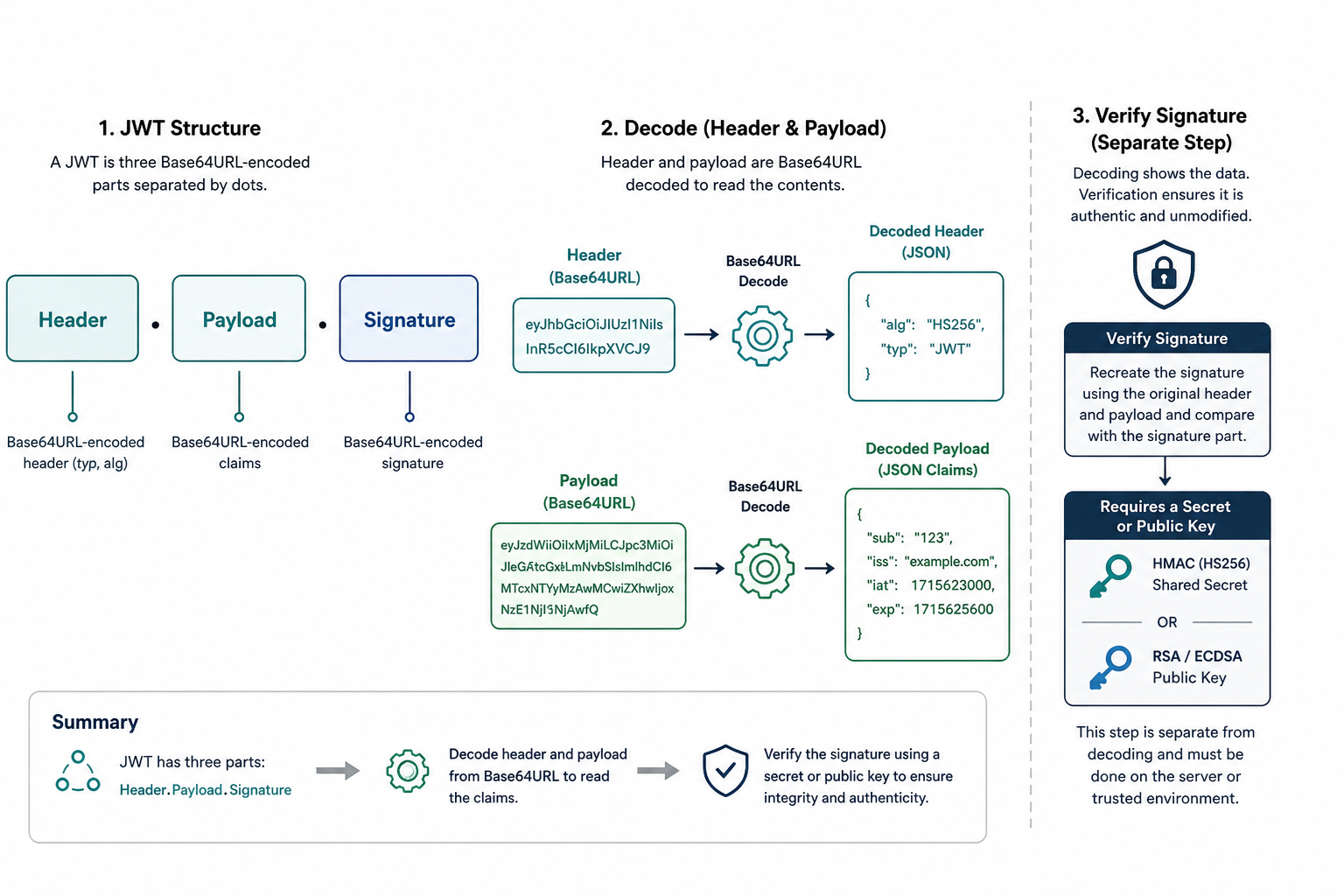
Figure 1: Decoding reads header and payload. Verification needs a secret or public key.
JWT structure: header, payload, signature
Every compact JWT looks like header.payload.signature. Each part is Base64URL-encoded (URL-safe Base64 using - and _, usually without = padding).
- Header: JSON with
alg(for example HS256 or RS256) and usuallytyp: "JWT". May includekidfor key rotation. - Payload: Claims about the subject. Registered claims include
sub,iss,aud,exp,iat, andnbf. Apps also add private claims. - Signature: Cryptographic proof over
base64url(header) + "." + base64url(payload). It is not encryption. It proves integrity and authenticity only when verified with the correct key.
Important: Base64URL is encoding, not encryption. Anyone who has the token can decode jwt contents. Never put passwords, API keys, or unredacted secrets in JWT claims. Use JWE if you need confidentiality.
Decode vs verify: methods compared
People often confuse reading a token with trusting a token. Use the right approach for the job:
| Approach | What It Does | Needs Key? | Best For |
|---|---|---|---|
| Online JWT Decoder (client-side) | Base64URL-decodes header and payload in the browser | No (decode) | Quick inspection and HMAC checks with a test secret |
| CLI / Node one-liner | Decodes locally in your terminal | No (decode) | Scripts, CI logs, offline debugging |
| Server JWT library | Verifies signature and validates claims | Yes | Production auth decisions |
| Server-side web debugger | May upload your token to a remote host | Depends | Avoid for production tokens |
Method 1: Decode JWT online with the free JWT Decoder (easiest)
The fastest way to decode jwt online without installing anything is our free JWT Decoder & Verifier. Decoding runs in your browser. Tokens are not sent to our servers.
Steps:
- Open the tool and stay on the Decode tab.
- Paste your JWT into the JWT Token field (or use the sample token to explore the UI).
- Header and payload decode automatically. Check the formatted JSON and claim explanations (
alg,exp,iat,sub, and more). - Optionally enter a Signing Secret to verify HS256, HS384, or HS512 signatures. RS256/ES256 need a public key and should be verified in your backend.
- Review expiration status badges, then copy a Permanent Link if you need to share the same decoded view with a teammate (prefer test tokens).
Treat production tokens like credentials. Prefer test tokens. Even with local processing, shared machines, screen shares, and browser extensions can expose session data.
Method 2: Decode a JWT from the command line
When you want everything offline, decode locally with tools you already have.
Node.js one-liner (payload)
node -e "const t=process.argv[1]; console.log(JSON.parse(Buffer.from(t.split('.')[1], 'base64url').toString()))" 'YOUR_JWT_HERE'jq pipeline (header and payload)
echo 'YOUR_JWT_HERE' | jq -R 'split(".") | .[0],.[1] | gsub("-";"+") | gsub("_";"/") | @base64d | fromjson'
These commands only decode. They do not prove the token is authentic. For production verification, use a maintained library such as jose (Node), firebase/php-jwt (PHP), or your framework's auth stack, with an explicit algorithm allow-list.
Method 3: Decode in the browser console
For a quick one-off check on a non-production token already in DevTools:
JSON.parse(atob(
  'YOUR_JWT_HERE'.split('.')[1]
    .replace(/-/g, '+')
    .replace(/_/g, '/')
));
Note: atob expects standard Base64. Convert Base64URL characters as shown. Padding may be required for some tokens. Prefer a dedicated decoder when segments are long or Unicode-heavy.
Tips and common mistakes
- Decoding is not verification: An attacker can craft any payload. Trust claims only after signature and claim checks on the server.
- Never store secrets in claims: Payloads are readable by anyone holding the token, including logs and proxies.
- Reject
alg: none: Unsecured JWTs skip signatures. Configure libraries with an allow-list (for example only HS256 or only RS256). - Truncated tokens fail decode: Tokens need exactly three dot-separated parts. Watch for copy/paste cuts in emails or chat apps.
- Clock skew and
exp: A token can look fine in a decoder yet fail in production if clocks disagree. Checkexp,nbf, and server time. - Do not paste signing secrets into random websites: HMAC verification needs the shared secret. Keep production secrets on the server.
Related free tools
- JWT Decoder & Verifier - Decode header and payload, check expiry, verify HS256/384/512.
- JSON Formatter - Pretty-print claim JSON after decoding.
- Base64 Decode - Decode Base64 or Base64URL segments manually.
- HMAC Generator - Experiment with HMAC digests used by HS* JWT algorithms.
Frequently Asked Questions
How do I decode a JWT online safely?
Use a client-side jwt decoder that processes the token in your browser and does not upload it to a server. Prefer test tokens. Treat any production JWT like a password because it can grant API or session access.
Does decoding a JWT require a secret key?
No. Header and payload are Base64URL-encoded JSON. Anyone with the token can decode them. A secret or public key is required only to verify the signature.
What is the difference between decoding and verifying a JWT?
Decoding reads the claims. Verifying recomputes the signature with the issuer key and confirms the token was not tampered with. Authentication decisions must always verify, not only decode.
Why does my JWT fail to decode?
Common causes are missing dots, truncated copy/paste, invalid Base64URL characters, or non-JSON header/payload content. A valid compact JWT has exactly three parts separated by dots.
Can an online decoder steal my signing secret?
The signing secret is never inside the JWT, so decoding alone cannot reveal it. The real risk is exposing the token itself (a usable credential) or pasting an HMAC secret into an untrusted verifier. Keep production secrets server-side.
JWTs are readable by design. Decode to inspect claims, verify on the server before you trust them, and keep secrets out of payloads. When you need a quick, private look at a token, open the free JWT Decoder above and paste a test token to explore header, payload, and expiry in seconds.


