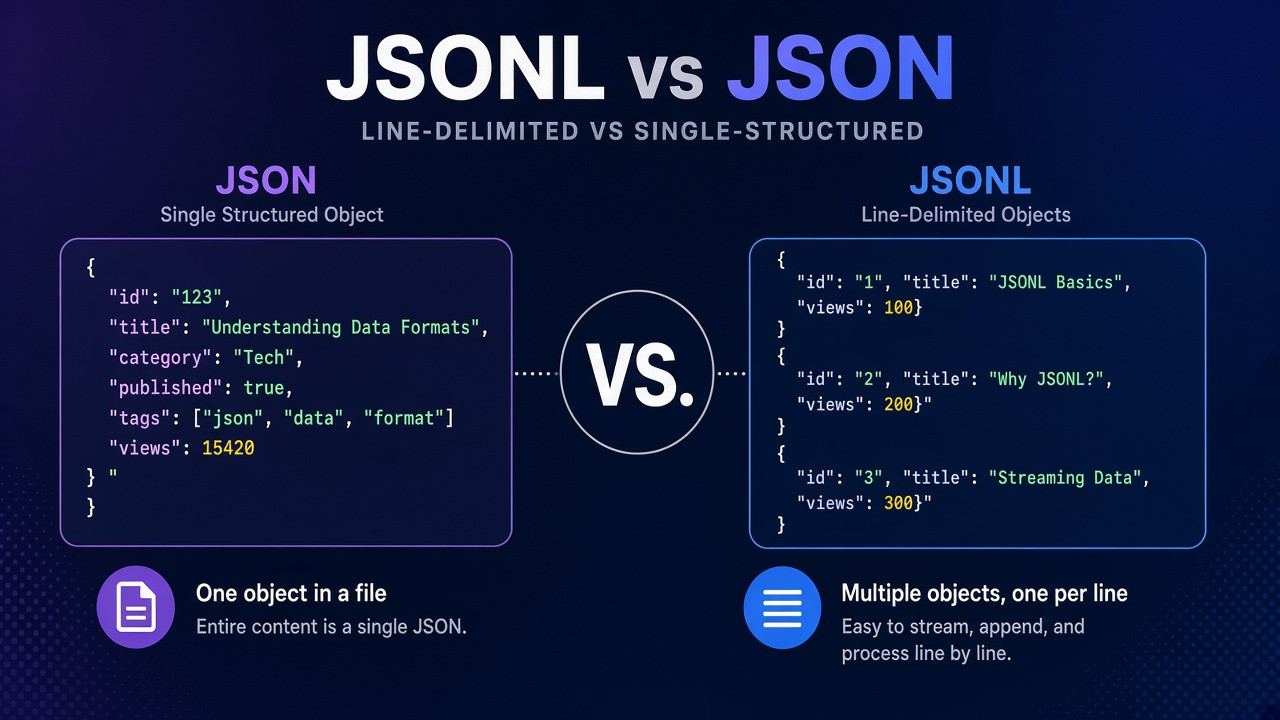
JSONL (JSON Lines, also called NDJSON or newline-delimited JSON) stores one complete JSON value per line, separated by line feeds. A normal JSON file is a single document: often one array wrapped in [ and ], or one object in { and }. You cannot paste an entire .jsonl export into JSON.parse() and expect it to work. This guide explains the difference, when each format wins, how to validate and convert data safely, and how to turn JSONL into a JSON array with our free JSONLINE to JSON converter. Conversion runs in your browser; your logs and exports are not uploaded to a server.
JSONL Record Rule
Required Encoding
Common Extension
Line-by-Line Parse
Key facts: JSONL vs JSON (quick reference)
Use this block when you need a concise answer for search or AI summaries:
- JSON (RFC 8259): one top-level value per file. Arrays use commas between elements and square brackets around the list.
- JSONL / JSON Lines (jsonlines.org): UTF-8 text, one valid JSON value per line, lines end with
\n(CRLF is accepted when parsing). No commas between lines, no outer array. - NDJSON is the same byte layout as JSONL with a different name and file extension (
.ndjson). Tools treat them interchangeably in practice. - Whole file validity: A
.jsonarray is one JSON value. A.jsonlfile is usually not valid JSON until you wrap lines into an array or parse line by line. - Streaming: JSONL supports append-one-line and read-one-line workflows (logs, ETL, ML datasets). JSON arrays require rewriting brackets and commas to append safely.
- Values per line: The spec allows any JSON value on a line (object, array, string, number, boolean,
null). Production files almost always use one JSON object per line. - Privacy: Our JSONLINE to JSON converter parses input with JavaScript in the browser. Paste or upload locally; no server-side storage.
What is JSONL (JSON Lines)?
JSON Lines is a text format for structured records. Each line is an independent JSON document. Parsers read the file sequentially: split on newlines, trim empty lines, run JSON.parse() on each non-empty line. That design matches how log shippers, BigQuery loads, OpenAI fine-tuning exports, and many analytics pipelines expect data.
Teams adopt JSONL when they need to:
- Stream events: Append a new JSON object when something happens without loading the full history into memory.
- Process huge exports: Map, filter, or grep one line at a time with Unix tools or language iterators.
- Isolate bad rows: One corrupted line fails that line only; the rest of the file may still be usable after repair.
- Feed ML and data science stacks: Hugging Face datasets, Spark, and many Python loaders accept
.jsonlnatively. - Bridge APIs and notebooks: Convert JSONL to a JSON array for tools that only accept standard JSON (spreadsheets, legacy validators, pretty-printers).
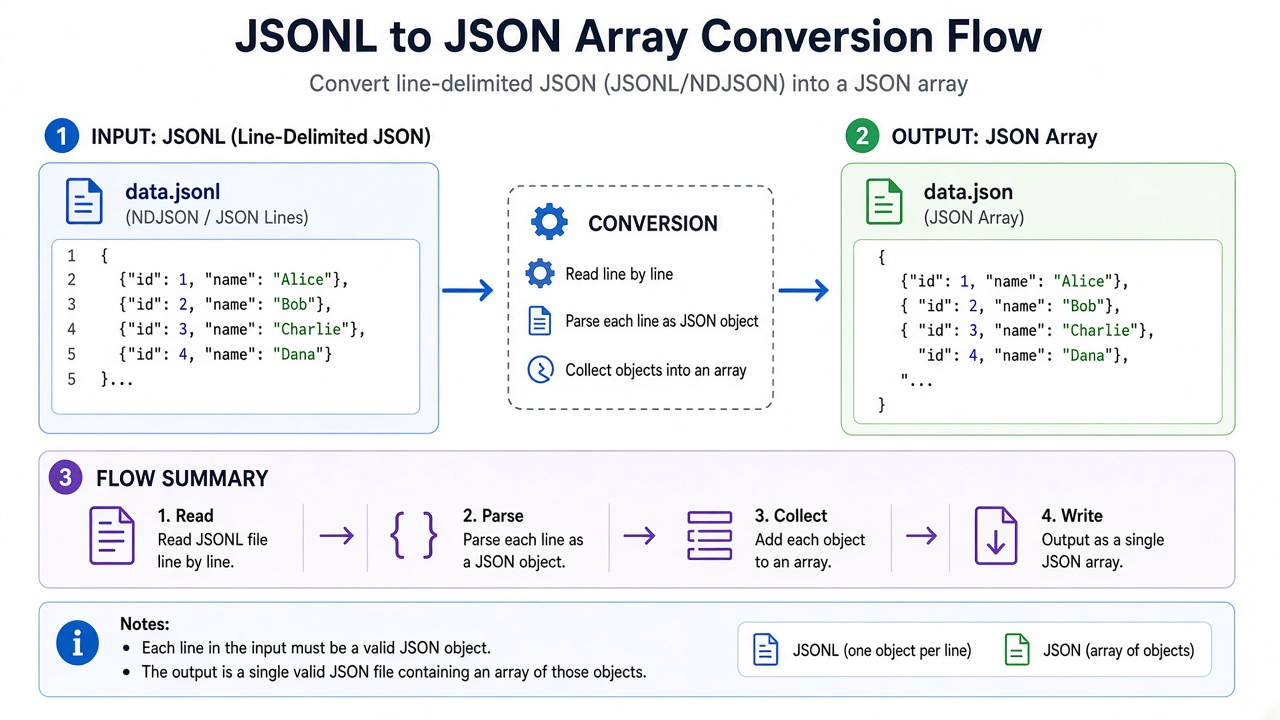
Figure 1: JSONL lines stand alone; a JSON array wraps the same records with brackets and commas.
JSON array vs JSONL: side-by-side
The same two records in both formats:
JSON array (valid single document):
[
  {"id": 1, "event": "signup"},
  {"id": 2, "event": "purchase"}
]
JSONL (two lines, not one JSON value):
{"id":1,"event":"signup"}
{"id":2,"event":"purchase"}
| Characteristic | JSON (array document) | JSONL / NDJSON |
|---|---|---|
Entire file is one JSON.parse() call |
Yes | No (parse per line) |
| Append a new record | Rewrite file or patch commas/brackets | Append one line + newline |
| Pretty-print one record across lines | Common | Avoid (breaks line-oriented parsers) |
Use with jq on whole file |
Natural for arrays | Use -c / slurp modes or line tools |
| Typical extensions | .json |
.jsonl, .ndjson |
| Top-level metadata once | Easy in one object wrapper | Repeat per line or use sidecar file |
Figure 2: Qualitative fit (higher is better). JSON arrays excel at atomic documents; JSONL excels at streaming and append-only pipelines.
JSONL vs NDJSON: naming and MIME types
JSON Lines and NDJSON describe the same on-disk layout. JSON Lines documentation uses .jsonl and suggests application/jsonl (not yet an IANA standard). The NDJSON community spec uses .ndjson and application/x-ndjson. Renaming data.jsonl to data.ndjson does not change the bytes. When an API docs page says "NDJSON stream," assume one JSON value per line unless they document extra framing (for example SSE wrappers).
Method 1: Convert JSONL to JSON online (recommended)
Use the JSONLINE to JSON converter when you have newline-delimited input and need a standard JSON array for Excel import, a formatter, or a library that only accepts one JSON document.
- Open the converter in Chrome, Firefox, Edge, or Safari.
- Paste JSONL into the JSONLINE Input panel, or use Upload to load a
.jsonl/.ndjson/.txtfile. - Wait for the output panel to update. Conversion is automatic: each non-empty line is parsed and collected into an array.
- Copy the formatted JSON from JSON Output, or download
download.jsonfrom the output actions. - Optional: run the result through the JSON Formatter if you need different indentation, or validate lines first with the JSONL Validator.
Example input (JSONL):
{"id":"Open"}
{"id":"OpenNew","label":"Open New"}
{"id":"Save","label":"Save"}
Example output (JSON array):
[
  {
    "id": "Open"
  },
  {
    "id": "OpenNew",
    "label": "Open New"
  },
  {
    "id": "Save",
    "label": "Save"
  }
]
The tool ignores blank lines between records (common in hand-edited files). Invalid JSON on any line clears output until you fix that line, which matches strict per-line parsing behavior.
Alternative methods: CLI, Python, and Node.js
jq (JSON array from JSONL)
Slurp lines into an array (GNU jq 1.6+):
jq -s '.' input.jsonl > output.json
Or map each line without slurp:
jq -c '.[]' output.json > rebuilt.jsonl
Python
import json

records = []
with open("input.jsonl", encoding="utf-8") as f:
    for line in f:
        line = line.strip()
        if line:
            records.append(json.loads(line))

with open("output.json", "w", encoding="utf-8") as out:
    json.dump(records, out, indent=2)
Node.js
import { readFileSync, writeFileSync } from "node:fs";

const lines = readFileSync("input.jsonl", "utf8")
  .split("\n")
  .filter((line) => line.trim() !== "")
  .map((line) => JSON.parse(line));

writeFileSync("output.json", JSON.stringify(lines, null, 2));
Reverse direction (JSON array to JSONL)
Export one object per line with our JSON to JSONLINE converter when a pipeline expects newline-delimited input.
Validation, edge cases, and production pitfalls
- Multi-line pretty JSON inside JSONL: Invalid. Each logical record must fit on one line (or use escaped newlines inside strings only).
- Trailing commas: Forbidden in JSON and in each JSONL line. A trailing comma after the last array element breaks
JSON.parse(). - Byte order mark (BOM): JSON Lines docs say do not include a UTF-8 BOM. Some Windows editors add one; strip it before parsing.
- Concatenated JSON objects without newlines: Not JSONL. Parsers expect newline delimiters between values.
- Scalar lines:
42or"hello"on one line is valid JSONL but rare. Our converter will include them as array elements. - Huge files: Browser tools load the full text into memory. For multi-gigabyte logs, prefer CLI streaming (
while read -r line, Python generators,jq). - Security: Parsing untrusted JSON can enable prototype pollution in some JavaScript setups. Treat exports like any user content; avoid
eval.
When to keep JSONL vs convert to JSON
- Keep JSONL: Log ingestion, incremental ETL, training data shards, and APIs that stream one record per chunk.
- Convert to JSON array: One-shot import into Postman collections, small config bundles, browser-based table viewers, and tools that call
JSON.parseonce on the entire payload. - Convert to CSV: For spreadsheet analysis of flat objects, use the JSON to CSV Converter after you have a JSON array.
Common mistakes and how to fix them
- Wrapping JSONL in brackets without commas: Still invalid. Either parse line by line or convert to a proper array.
- Commas between JSONL lines: Remove them. Commas belong inside JSON arrays, not between lines in a
.jsonlfile. - Single quotes: JSON requires double quotes for strings. Replace single-quoted pseudo-JSON before converting.
- NDJSON vs JSONL confusion: Same format. Match the file extension your downstream tool expects.
- Assuming the converter fixes schema: It only changes layout. Field names and types stay as in the source lines.
Related tools and guides
- JSON to JSONLINE converter: array to newline-delimited export.
- JSONL Validator: find the first bad line before conversion.
- JSON Formatter: beautify the array after conversion.
- JSON to CSV Converter: flatten objects for Excel or Google Sheets.
- JWT decoding guide: another common JSON-in-text workflow for developers.
Frequently Asked Questions
Is JSONL the same as NDJSON?
Yes for practical purposes. Both mean UTF-8 text with one JSON value per line, separated by newlines. File extensions (.jsonl vs .ndjson) and suggested MIME types differ, but the record layout is the same.
Can I parse a whole JSONL file with JSON.parse()?
No. JSON.parse() expects one JSON value. A JSONL file contains many values. Parse each line separately, or convert the file to a JSON array first with a converter or script.
Why convert JSONL to JSON?
Some tools only accept a single JSON document (often an array). Converting wraps each line's object into one array so formatters, importers, and legacy APIs can process the dataset in one step.
Does every JSONL line have to be an object?
The JSON Lines specification allows any JSON value per line. Real-world files almost always use objects. Scalars and arrays on a line are valid but may be rejected by strict importers that expect objects only.
Is the JSONLINE to JSON converter private?
Yes. Parsing happens in your browser with JavaScript. Paste or upload locally; the site does not need to store your export to perform the conversion.
When you need a standard JSON array from newline-delimited logs or exports, use the JSONLINE to JSON converter: paste or upload JSONL, get indented JSON, copy or download, and move on to formatting or CSV export without installing desktop utilities.


