MP3 to Base64 conversion turns compressed audio bytes into a text-safe string you can paste into JSON bodies, OpenAPI examples, HTML prototypes, and JavaScript bundles. The usual output is either a raw Base64 payload or a full data URI such as data:audio/mpeg;base64,SUQzBAAAAAA.... This guide explains when inline audio makes sense (and when a normal .mp3 URL is better), how browser encoding works, MIME types, size limits, and how to convert MP3 to Base64 online with our free MP3 to Base64 Converter. Encoding runs in your browser; files are not uploaded to a server.
Base64 Overhead
Registered MIME
Base64 Standard
Browser Encoding
Key facts: MP3 to Base64 (quick reference)
Use this block when you need a concise answer for search or AI summaries:
- MP3 is a lossy audio codec. The file on disk is binary data (frames, headers, optional ID3 tags), not human-readable text.
- Base64 maps those bytes to printable ASCII (RFC 4648). It is encoding, not encryption. Anyone can decode it back to the original MP3 bytes.
- Data URI prefix:
data:audio/mpeg;base64,followed by the Base64 payload. Some APIs want only the payload without the prefix. - Size tradeoff: Base64 expands binary size by roughly 33% (four output characters per three input bytes). A 300 KB clip becomes about 400 KB of text.
- When to inline: UI beeps, short voice prompts, test fixtures, and demos under a few hundred kilobytes. Full songs belong on a CDN with cache headers.
- MIME type: Prefer
audio/mpegin data URIs and API metadata.audio/mp3is a common alias but not the IANA-registered type. - Privacy: Our MP3 to Base64 Converter uses
FileReaderin JavaScript. Your audio stays on your device unless you paste the string elsewhere.
What is MP3 to Base64 encoding?
Converting MP3 to Base64 means reading the file as bytes, encoding those bytes with Base64, and optionally wrapping the result in a data URI so browsers and mobile WebViews can play it without a separate download.
Teams search for mp3 to base64 converter tools when they need to:
- Send audio in JSON APIs: REST or GraphQL fields that accept Base64 blobs instead of multipart uploads during prototyping.
- Embed sound in HTML or JavaScript: Click sounds, notification chimes, or guided tour voice lines inside a single file demo.
- Mock mobile or IoT payloads: Configuration documents that include a short alert clip as text.
- Document OpenAPI examples: Paste a truncated sample string next to a schema that describes
format: byteor custom audio fields. - Test decode pipelines: Verify that your backend correctly accepts Base64, strips prefixes, and writes valid
.mp3files.
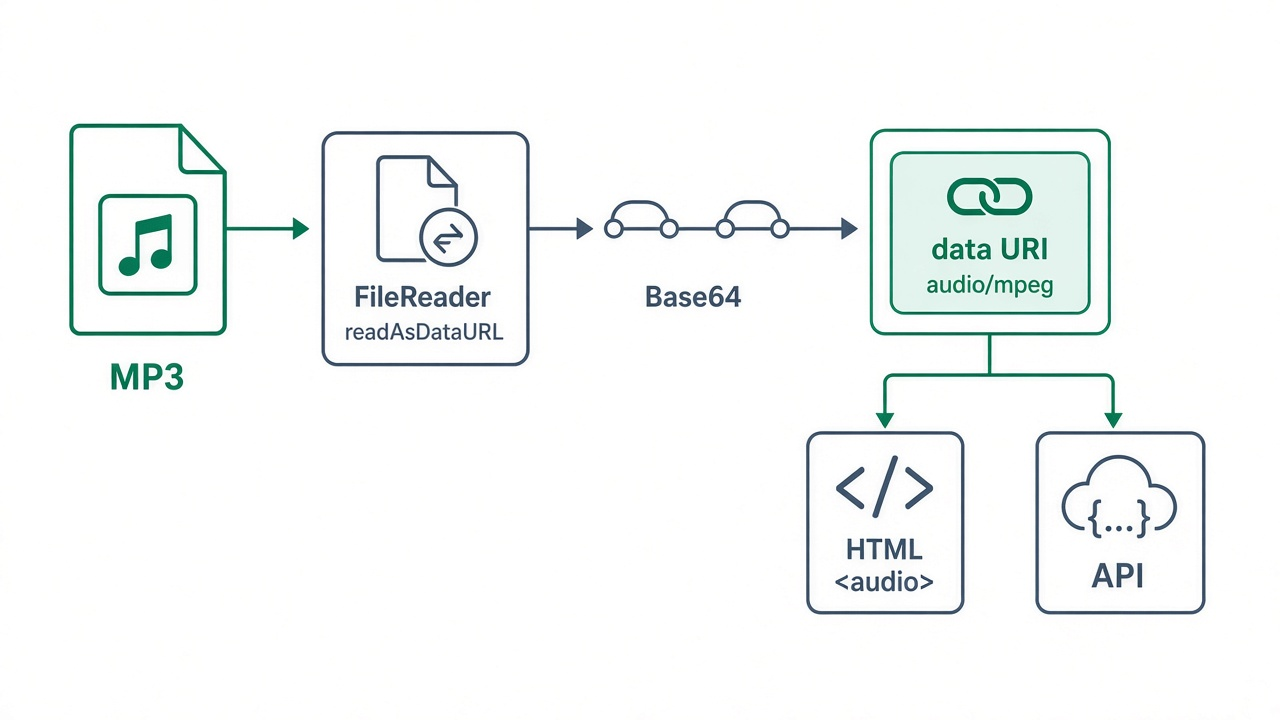
Figure 1: Typical path from an MP3 file to an embeddable Base64 data URI.
Data URI vs hosted MP3 vs Base64-only payload
| Approach | Example | Best for | Main tradeoff |
|---|---|---|---|
Hosted .mp3 URL |
/sounds/click.mp3 |
Production apps, streaming, HTTP caching, large clips | Requires hosting, CORS, and cache configuration |
| Data URI in HTML or JS | data:audio/mpeg;base64,SUQz... |
Tiny effects, offline demos, single-file prototypes | No separate cache entry; whole page or bundle must reload together |
| Base64 only (no prefix) | SUQzBAAAAAA... |
JSON audioBase64 fields, databases, gRPC-style messages |
Consumers must add MIME metadata themselves |
| Multipart upload | multipart/form-data file part |
Real uploads to object storage or transcode services | More moving parts than a text field in early mocks |
Figure 2: Illustrative relative size for the same 100 KB MP3 (Base64 expansion follows RFC 4648 4:3 ratio; data URI adds a small prefix).
Method 1: Convert MP3 to Base64 online (recommended)
The fastest workflow for most developers is our browser-based MP3 to Base64 Converter. Upload one or more .mp3 files, convert, preview audio, then copy or download the strings.
- Open the MP3 to Base64 Converter.
- Click Upload MP3 Files and select one or more
.mp3files (batch mode is supported). - Leave Include Data URL format checked if you need a paste-ready
data:audio/mpeg;base64,...string. Uncheck it when your API expects raw Base64 only. - Click Convert to Base64. Each file appears in the results panel with an audio player for verification.
- Copy Base64 String or Data URL, or use Download to save a
.txtfile for tickets or documentation.
Example HTML after conversion (data URI in src):
<audio controls src="data:audio/mpeg;base64,SUQzBAAAAAAAI1RTU0UAAAAPAAADTGF2ZjU4LjI5LjEwMAAAAAAAAAAAAAAA//uQx...">
  Your browser does not support the audio element.
</audio>
Example JSON field (raw Base64, no prefix):
{
  "fileName": "notification.mp3",
  "contentType": "audio/mpeg",
  "audioBase64": "SUQzBAAAAAAAI1RTU0UAAAAPAAADTGF2ZjU4LjI5LjEwMAAAAAAAAAAAAAAA//uQx..."
}
Example JavaScript playback:
const clip = new Audio("data:audio/mpeg;base64,SUQzBAAAAAA...");
clip.play().catch((err) => console.error("Playback blocked:", err));
Method 2: Command line (macOS, Linux, WSL)
Encode the binary file and wrap the data URI yourself:
# Raw Base64 only (GNU coreutils: single line)
base64 -w 0 alert.mp3

# Full data URI (GNU base64)
echo -n "data:audio/mpeg;base64,$(base64 -w 0 alert.mp3)"
On macOS, remove newlines from base64 output:
echo -n "data:audio/mpeg;base64,$(base64 alert.mp3 | tr -d '\n')"Decode back to an MP3 file for sanity checks:
base64 -d alert.b64.txt > restored.mp3Method 3: JavaScript with FileReader (browser)
Our converter uses the same API documented on MDN: FileReader.readAsDataURL() returns a data URI; split on the first comma to get raw Base64.
function mp3FileToBase64(file) {
  return new Promise((resolve, reject) => {
    const reader = new FileReader();
    reader.onload = () => {
      const dataUrl = reader.result;
      const base64 = dataUrl.split(",")[1];
      resolve({ dataUrl, base64 });
    };
    reader.onerror = () => reject(reader.error);
    reader.readAsDataURL(file);
  });
}
For very large files in modern browsers, you can read an ArrayBuffer and encode with btoa on byte chunks, but data URIs still load the entire clip into memory at once.
Prepare MP3 files before you encode
- Trim silence: Leading and trailing silence inflates Base64 strings without improving UX.
- Use mono for voice: 64 kbps mono is often enough for alerts and IVR-style prompts.
- Strip embedded cover art: ID3-attached JPEG thumbnails can be larger than the audio itself.
- Keep clips short: Treat anything above a few hundred kilobytes as a signal to host the file normally.
- Confirm licensing: Only embed audio you have rights to redistribute inside apps or documentation.
API and backend notes
- Validate on the server: Check magic bytes (MP3 frames often start with
ID3or sync word0xFF) after Base64 decode, not just string length. - Reject oversize payloads: Set max JSON body size. A 5 MB song becomes roughly 6.7 MB of Base64 text plus JSON overhead.
- Store binaries, not Base64, in production databases: Base64 in rows is convenient for mocks but wastes space and CPU on every read.
- Document both formats: Clarify whether clients should send
data:audio/mpeg;base64,prefixes or raw payloads only. - Use our Base64 Validator on suspicious strings before you wire them into CI fixtures.
Common mistakes and how to fix them
- Wrong MIME type: Use
audio/mpegin data URIs andContent-Typeheaders for broad compatibility. - Line breaks inside Base64: PEM-style wrapping breaks JSON and data URIs. Use single-line output (
base64 -w 0on Linux). - Pasting the data URI into a field that expects raw Base64: Strip everything before the first comma.
- Autoplay blocked: Browsers require user gestures for
audio.play()in many cases. Provide a button click handler. - Encoding non-MP3 files: Our tool filters to
.mp3/audio/mpeg. For WAV or OGG, use a general Base64 Encoder Decoder or raster-focused Image to Base64 for cover art only. - Expecting security: Base64 is trivially reversible. Do not hide licensed or private audio behind encoding alone.
Related tools and guides
- Base64 Encoder Decoder: encode or decode arbitrary text and small files.
- Base64 Validator: verify padding and alphabet before you commit fixtures.
- SVG to Base64 Converter: vector icons use a different MIME type and workflow.
- Image to Base64: raster assets for album art or UI sprites.
- What Is Base64 Encoding? A Beginner's Guide: fundamentals shared by every encoder on the site.
- SVG to Base64 guide: companion post for inline vector assets.
Frequently Asked Questions
What is the difference between MP3 to Base64 and Image to Base64?
MP3 to Base64 encodes compressed audio binary frames. Image to Base64 encodes raster bytes from PNG, JPEG, or similar formats. Both may produce data URIs, but MIME types (audio/mpeg vs image/png) and playback APIs differ.
Should I use audio/mpeg or audio/mp3 in a data URI?
Prefer audio/mpeg, the IANA-registered type. Some browsers accept audio/mp3, but servers, email clients, and strict API validators may reject the alias.
How large can an MP3 be before Base64 is a bad idea?
There is no hard limit in our tool (browser memory is the practical cap), but inline encoding is best for short clips, often under a few hundred kilobytes. Larger files bloat HTML, JavaScript bundles, and JSON logs, and they cannot be cached independently like a normal MP3 URL.
Can I play an MP3 data URI in every browser?
Modern desktop and mobile browsers support <audio src="data:audio/mpeg;base64,..."> and new Audio(dataUri) for standard MP3 content. Very old clients or unusual embed environments may still require a hosted file URL.
Is the online MP3 to Base64 converter private?
Yes. Conversion uses JavaScript and the FileReader API in your browser. Open DevTools Network while converting: you should not see an upload request for your audio file. Only paste operations you perform yourself send data elsewhere.
When you need a paste-ready data:audio/mpeg;base64,... string or a raw payload for JSON, use the MP3 to Base64 Converter: upload MP3s, preview playback, copy Base64 or data URLs, and ship API examples without extra desktop software.


