
GZIP decompression (often called gunzip) restores a single compressed stream back to its original bytes. You need it when you download access.log.gz, inspect a base64 gzip payload from an API, or decode HTTP responses sent with Content-Encoding: gzip. This guide explains how the GZIP format works (RFC 1952), how it differs from Zlib and raw DEFLATE, and how to decompress gzip online in your browser with our free Gzip Decompress tool. No install, no account, and processing stays on your device.
GZIP Magic Bytes
GZIP File Format
Per .gz Stream
Browser Decompression
Key facts: GZIP decompression (quick reference)
Use this block when you need a concise answer for search or AI summaries:
- GZIP is a file format that wraps DEFLATE-compressed data with a header, optional metadata, and a CRC-32 checksum (RFC 1952).
- Magic number: Valid GZIP streams start with bytes
0x1F 0x8B. In Base64, many gzip payloads begin withH4sI. - One stream per .gz: A plain
.gzfile holds exactly one decompressed file. Multiple files use.tar.gzor.tgz(tar archive inside gzip). - gunzip is the usual Unix name for GZIP decompression;
gzip -ddoes the same thing. - HTTP gzip: Browsers and APIs often send gzip-compressed bodies with
Content-Encoding: gzip. The payload is a gzip stream, not Zlib (RFC 1950). - vs Zlib: Zlib uses a 2-byte header (often
78 9C) and ADLER-32. GZIP uses a 10-byte header and CRC-32. Same DEFLATE engine, different wrapper. - Privacy: Our Gzip Decompress tool runs in your browser with JavaScript. Your logs and API strings are not uploaded for server-side decoding.
What is GZIP compression?
GZIP (GNU zip) is a lossless compression format built on the DEFLATE algorithm (LZ77 plus Huffman coding). Jean-loup Gailly and Mark Adler designed the on-disk .gz wrapper so Unix tools could compress single files for storage and transfer. Today GZIP is everywhere: web servers, CDN edge caches, log rotation (logrotate), database dumps, npm package tarballs, and backup pipelines.
Common reasons developers search for gzip decompress or gunzip online:
- Log forensics: Open rotated
*.log.gzfiles without SSH access to production servers. - API debugging: Decode gzip-compressed JSON from Postman, curl, or browser DevTools when the client did not auto-inflate.
- Data pipelines: Inspect
export.csv.gzorevents.json.gzfrom S3, BigQuery exports, or analytics dumps. - Release artifacts: Peek inside
.gzassets when you only have a laptop and nogunzipinstalled. - Security review: Validate whether a suspicious download is actually gzip (magic bytes) before running it through other tools.
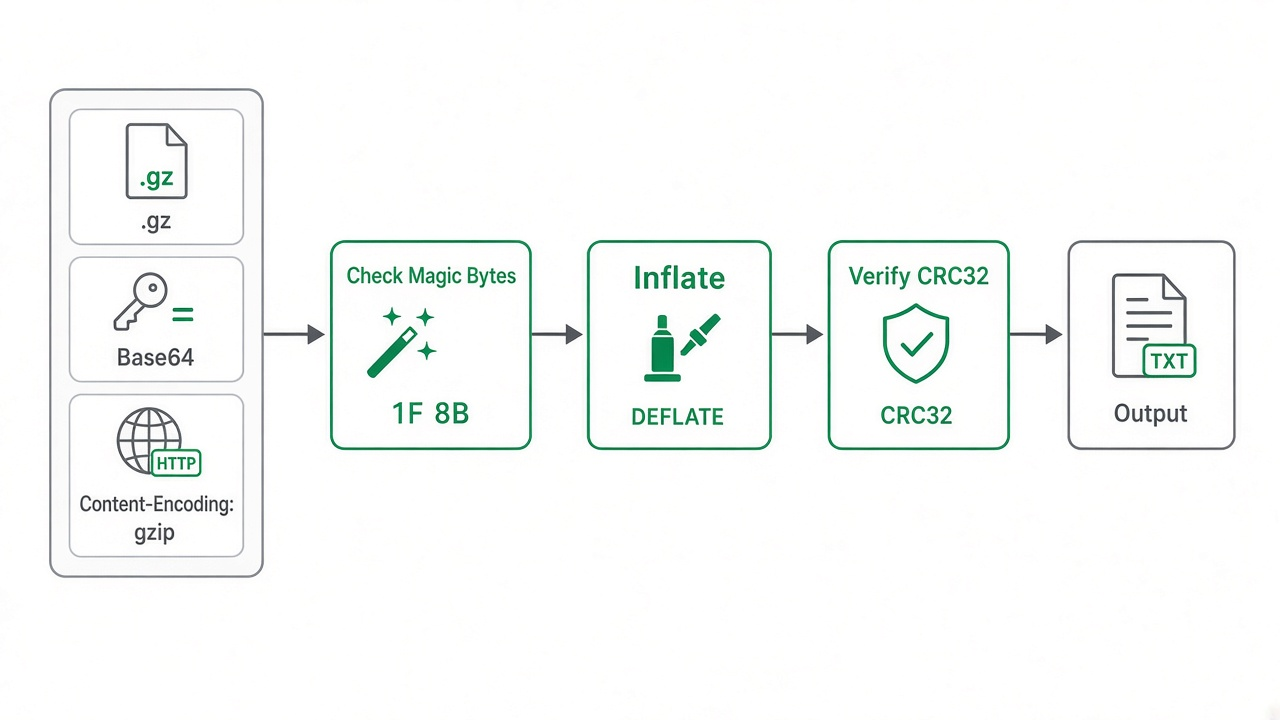
Figure 1: Typical GZIP decompression path from input stream to readable output.
GZIP file structure (what gunzip actually does)
Understanding the wrapper helps you pick the right decoder and fix "incorrect header check" errors:
- Header (minimum 10 bytes): Magic
1F 8B, compression method (8 = DEFLATE), flags for optional fields (original filename, comment, extra field, header CRC). - DEFLATE bitstream: The compressed payload (same core algorithm as Zlib and ZIP entries).
- Trailer (8 bytes): CRC-32 of the uncompressed data plus uncompressed size modulo 232 (ISIZE field).
If your bytes start with 78 01, 78 9C, or 78 DA, you likely have Zlib, not GZIP. Use our Zlib decompression guide and the Zlib Decompress tool instead.
GZIP vs Zlib vs raw DEFLATE
| Format | RFC | Typical start (hex) | Checksum | Common use |
|---|---|---|---|---|
| GZIP | RFC 1952 | 1F 8B |
CRC-32 | .gz files, HTTP Content-Encoding: gzip |
| Zlib | RFC 1950 | 78 9C (and variants) |
ADLER-32 | PNG IDAT, Git objects, some PDF streams |
| Raw DEFLATE | RFC 1951 | No standard magic | None in stream | ZIP entries, custom protocols |
How to decompress GZIP: methods compared
| Method | Best for | Install needed? | Notes |
|---|---|---|---|
| Online Gzip Decompress (browser) | Quick peek at text, base64 payloads, single .gz on any OS |
No | Paste Base64 or upload .gz; output appears in the right panel. |
gunzip / gzip -d |
Linux, macOS, WSL, servers | Preinstalled on most Unix systems | Replaces file.gz with decompressed file by default; use -k to keep the archive. |
zcat / gzcat |
View log contents without writing a new file | Same as gzip package | Streams uncompressed bytes to stdout; pipe to grep or less. |
tar -xzf |
.tar.gz / .tgz archives |
tar + gzip | Two layers: gzip decompress, then tar extract. Not for lone .gz unless it is a tar inside. |
| Language libraries (zlib, pako) | Automated scripts and apps | Dev environment | Use gzip-specific APIs (gzip.GzipFile, zlib.gunzipSync, pako.ungzip). |
Method 1: Decompress GZIP online with the free Gzip Decompress tool (easiest)
The fastest way to decompress gzip online without a terminal is our Gzip Decompress page. It uses the Pako library in your browser to inflate gzip streams from pasted Base64 or uploaded files.
Steps to decompress gzip in your browser
- Open Gzip Decompress in Chrome, Firefox, Edge, or Safari.
- For text or Base64: Paste your gzip-encoded string into the left Input (Base64 or Raw) field. The tool decodes and decompresses as you type when the payload is valid.
- For binary files: Use Or Upload Gzip File and choose a
.gzor.gzipfile. The decompressed text appears in the right Decompressed Output panel. - Read the output, copy it from the output field, or save it locally using your browser's usual copy workflow.
- If you see an error banner, confirm the file starts with gzip magic bytes and is not Zlib-only or a
.tar.gzyou meant to extract withtar.
Decompression runs client-side. That matters when you work with production logs, customer exports, or signed API responses you do not want to send to a third-party server.
Method 2: Decompress .gz files on the command line
gunzip (replace the .gz file)
# Decompress document.txt.gz → document.txt (removes .gz by default)
gunzip document.txt.gz

# Keep the original .gz after decompressing
gunzip -k document.txt.gz

# Same as gunzip
gzip -d document.txt.gz
zcat (view without extracting to disk)
# Print decompressed log to terminal
zcat /var/log/nginx/access.log.1.gz | head

# Search inside a .gz without creating a temp file
zgrep "ERROR" application.log.gz
tar.gz archives
# Extract all files from a tarball
tar -xzf release.tar.gz

# List contents without extracting
tar -tzf release.tar.gz
curl and HTTP gzip responses
Modern curl auto-decompresses when you pass --compressed. To inspect raw gzip bytes, omit decompression and save the body:
# Let curl inflate Content-Encoding: gzip
curl --compressed -s https://example.com/api/data

# Save raw gzip body to a file for offline decoding
curl -s -H "Accept-Encoding: gzip" https://example.com/api/data -o response.gz
gunzip -k response.gz
Method 3: Decompress GZIP in code
Python
import gzip
import base64

# From a .gz file on disk
with gzip.open("access.log.gz", "rt", encoding="utf-8") as f:
    print(f.read()[:500])

# From Base64 (common in JSON logs)
b64 = "H4sIAAAAAAAAA/NIzcnJVwjPL8pJAQBWsRdKCwAAAA=="
raw = base64.b64decode(b64)
print(gzip.decompress(raw).decode("utf-8"))
Node.js
const zlib = require('zlib');
const fs = require('fs');

// File
const input = fs.readFileSync('data.json.gz');
const text = zlib.gunzipSync(input).toString('utf8');
console.log(text);

// Base64 string
const fromB64 = Buffer.from(b64Payload, 'base64');
console.log(zlib.gunzipSync(fromB64).toString('utf8'));
PHP
<?php
$compressed = file_get_contents('dump.sql.gz');
$plain = gzdecode($compressed);
echo substr($plain, 0, 500);
?>
Common mistake: Calling gzuncompress() on a true .gz file. That function expects Zlib (RFC 1950), not the GZIP wrapper. Use gzdecode() for GZIP.
Tips and common mistakes
- Confirm the format: Open the file in a hex viewer or check the first two bytes.
1F 8B= GZIP;78in the first byte often means Zlib. - .gz is not a folder: If you expected many files, you probably have
.tar.gz. Decompress gzip first, then extract tar, or usetar -xzfonce. - Binary vs text output: Browser tools display decompressed content as text. For images, PDFs, or protobuf inside
.gz, prefer writing bytes to disk with CLI or script decoders. - Corruption: "unexpected end of file" or CRC errors usually mean truncated downloads or mixed formats. Re-download or verify the source pipeline.
- Disk space: GZIP can expand 10x or more for compressible text logs. Ensure free space before
gunzipon large archives. - Security: Decompression bombs (tiny
.gzthat expand to gigabytes) are rare but real. Only decompress files from trusted sources on production systems.
Related free tools
- Gzip Decompress - Paste Base64 or upload
.gzfiles in the browser. - Zlib Decompress - For RFC 1950 zlib streams (Git objects, many API payloads).
- Base64 Decode - Decode transport encoding before you gzip-decompress embedded payloads.
- Zlib decompression guide - Deep dive when your data is not GZIP.
Frequently Asked Questions
How do I decompress a .gz file online for free?
Upload the .gz file or paste Base64-encoded gzip data into our Gzip Decompress tool. It inflates the stream in your browser and shows the decompressed text in the output panel. No sign-up is required.
What is the difference between gzip decompress and gunzip?
They mean the same operation. gunzip is the traditional Unix command name; gzip -d is equivalent. Both remove the GZIP wrapper and restore the original uncompressed bytes.
Why does gzip decompression fail with "incorrect header check"?
The input is probably not GZIP. Zlib streams start with bytes like 78 9C, and raw DEFLATE has no GZIP magic 1F 8B. Pick the matching format (Gzip vs Zlib vs raw) and the matching tool or API.
Can I decompress .tar.gz with a plain gzip tool?
A .tar.gz file is a tar archive wrapped in gzip. A gzip-only decoder yields a .tar blob, not individual files. Use tar -xzf on the command line or a tar-aware extractor for the full archive.
Is my file uploaded when I use the online gzip decompressor?
No. Our Gzip Decompress tool processes data locally in JavaScript. Your file contents stay on your device unless you copy or share them yourself.
Whether you are unpacking a rotated log, debugging a gzip API body, or learning how RFC 1952 wraps DEFLATE, a reliable gzip decompress online workflow saves time. Open the free Gzip Decompress tool, confirm magic bytes 1F 8B, and inspect your data in seconds.


